
Explainers
Does Gemini's Memory Import Actually Work? Here's What It Really Does
Gemini's memory import sounds like a convenience. Here's what actually happens to your data, including why opt-outs from ChatGPT and Claude don't follow.
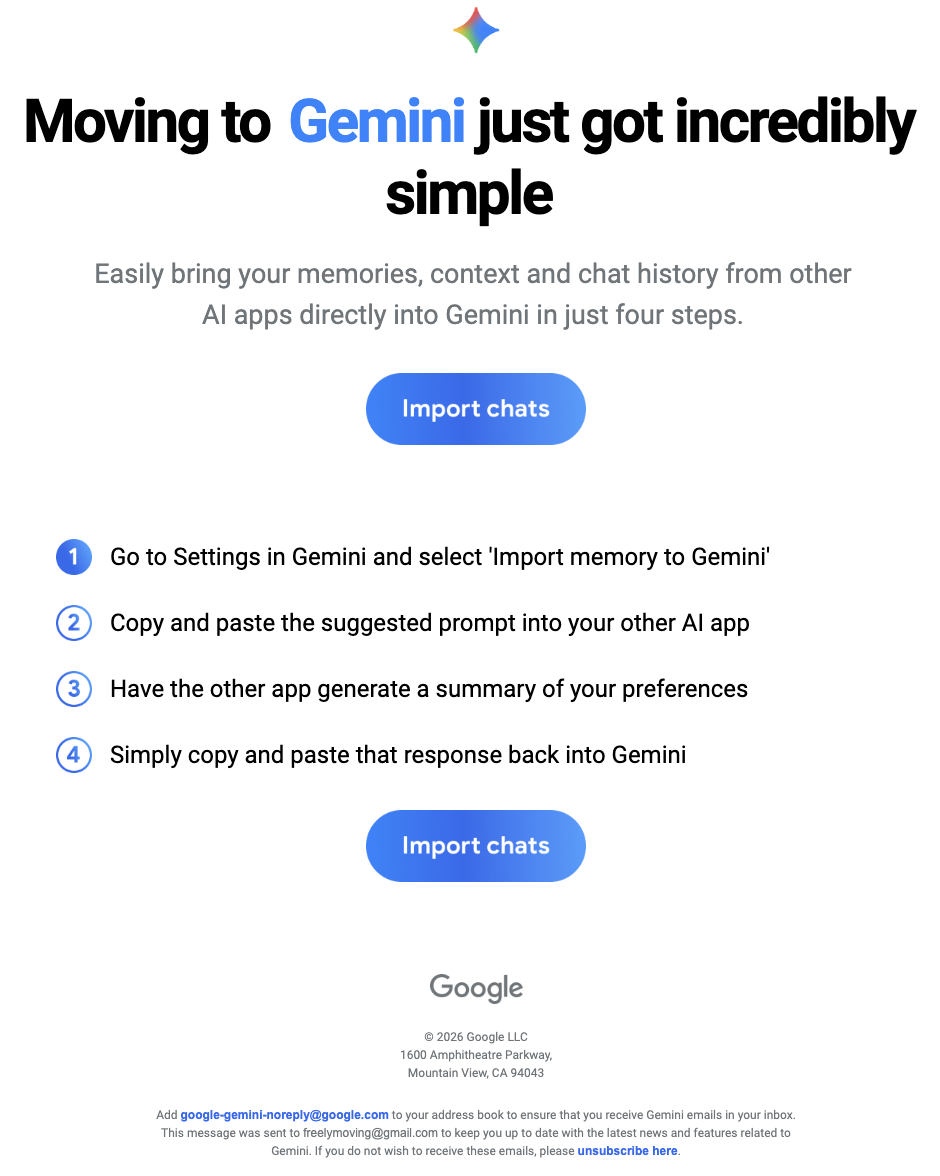
Got an email from Google this morning. "Moving to Gemini just got incredibly simple."
Opened it expecting a feature.
The feature is a prompt. Copy it into ChatGPT or Claude. Get a summary back. Paste the summary into Gemini.
That's the import.
The biggest AI company in the world solved cross-platform memory with copy and paste. And the more I looked at it, the worse it got. Not because the copy-paste thing is silly, though it is. Because of what happens to your data once it lands in Gemini.
The four-step magic trick
The email lays out four steps. Open Gemini settings. Copy a prompt. Paste it into another AI. Paste the response back. Done.
The prompt itself asks the source AI to summarise everything it remembers about you, organised into five categories: demographics, interests, relationships, recent events and projects, and instructions. It asks for verbatim quotes "where possible" and dates as evidence. The output is meant to look like a structured profile.
This isn't memory transfer. It's an LLM writing a CV about you, based on whatever its memory feature happens to have stored, which is itself a summary of your conversations.
Summary of a summary. Two layers of compression before Gemini sees a single token.
ChatGPT's memory has two parts. There are "saved memories", which you can actually see, edit, and delete in settings. And there's "reference chat history", which is a softer thing where ChatGPT pulls patterns and details from your past chats without you ever seeing what it's drawn out. You can turn the chat history feature off entirely, but you can't open it up and edit what it's inferred about you the way you can with saved memories. So when Google's prompt asks ChatGPT to "go through our past conversations and sum up what you know about me", a lot of what comes back is from that opaque layer. You're not in the room when it gets summarised.
And LLM responses are bounded. Typical outputs sit in the low thousands of words. You cannot fit a year of context into a couple of thousand words. The model will pick what it thinks matters and drop everything else.
It's also one-shot. The moment you have a new conversation in ChatGPT after the import, Gemini's "memory" is stale. There's no sync. There's no thread you can return to. There are no actual conversations on the other side, just a paragraph that claims to summarise them.
It's not really an import. It's a vibe transfer.
The ZIP option nobody is talking about
Below the prompt there's a second option, much quieter, with no marketing energy behind it.
You can upload a ZIP file of your exported chats from a "supported AI provider", up to 5GB. Currently that means ChatGPT or Claude.
This one is at least a real import. Your actual conversations get uploaded and Gemini can reference them.
But the practical issues stack up. ChatGPT's data export takes up to 24 hours to land in your inbox after you request it. My last Claude export took days, and only completed because Anthropic had to handle it manually after the automated job kept failing on file size. So the 5GB cap is going to be a real constraint for anyone with more than light usage. There's also a five-ZIPs-per-day upload limit on the Gemini side.
It's a more honest attempt than the prompt method, but it's still the user doing the integration work the platforms refuse to do for each other.
What's actually happening to your data
Here's where the post stops being funny.
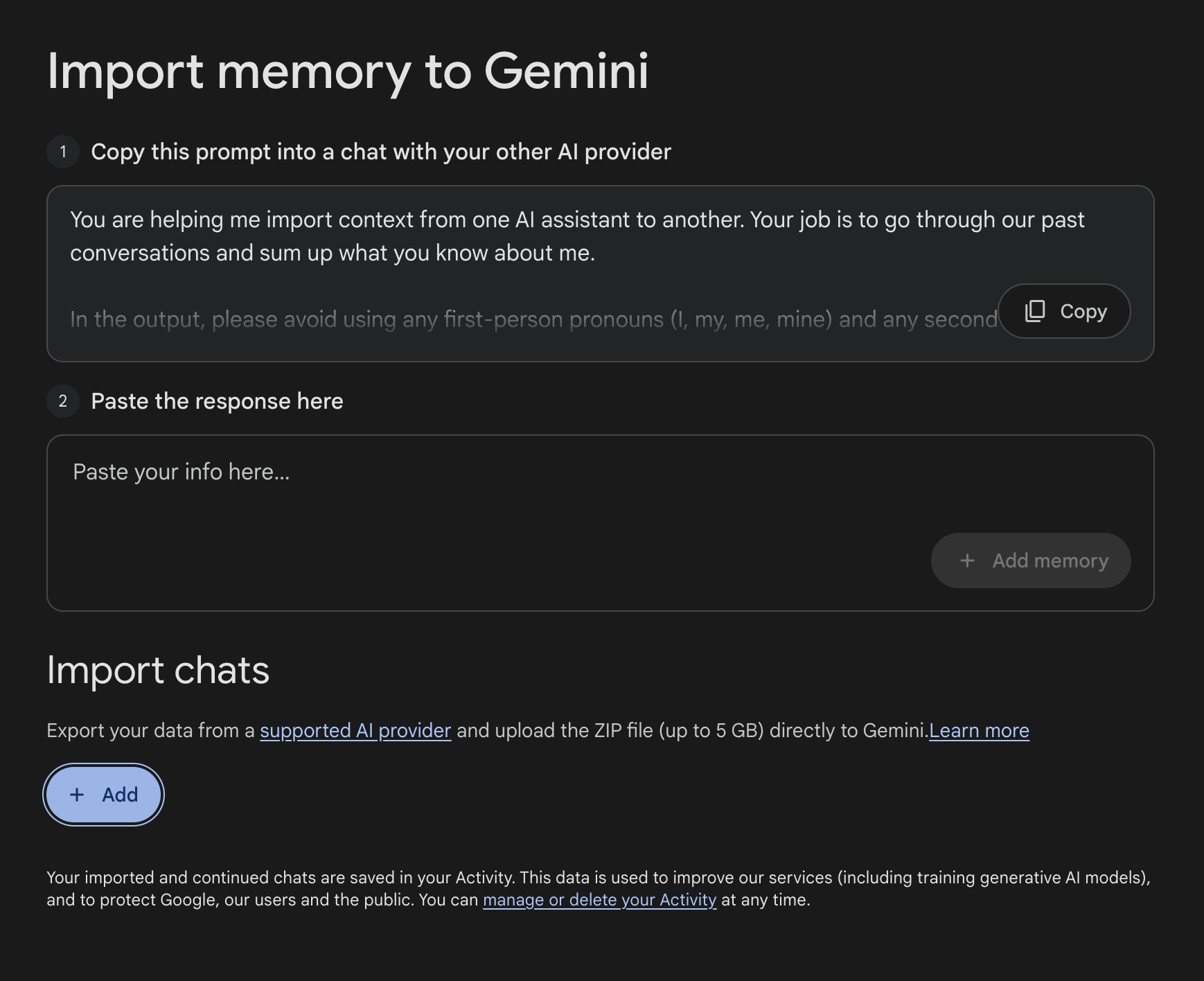
Read the small print on Google's import page:
"Your imported and continued chats are saved in your Activity. This data is used to improve our services (including training generative AI models)."
So whatever you upload — whether through the silly prompt method or the ZIP method — becomes training data for Google's AI models.
Fair enough, you might think. I'll just turn off the training setting.
There isn't one.
The toggle that doesn't exist
Google has a single setting called "Keep Activity". Turn it on, and Gemini saves your chats so you can continue conversations and so the connected apps work. Turn it off, and it doesn't.
Read the description on the settings page:
"Keeping your activity lets you pick up chats where you left off at any time and helps improve Google services, including AI models."
The same toggle controls both things. Memory and training are fused.
The Privacy Hub spells it out further. With Keep Activity on, "Google uses your activity to provide, develop, and improve its services (including training generative AI models)." With it off, your chats are kept for 72 hours and then deleted, and Gemini loses access to most of the things it connects to. Workspace, Maps, YouTube, Photos, Spotify, Home, Flights, Hotels, the import feature itself. Anything that needs persistent context to work.
There's no "remember my chats but don't train on them" option for text.
There is for audio. The audio and Gemini Live recordings setting is a separate toggle, and it's off by default. Google built that opt-out specifically. They chose not to build the equivalent for text.
So your two options are: let Google train on everything, or use Gemini in a state of permanent amnesia with most of its connected apps disabled.
By default it's the first one. Auto-delete is set to 18 months, which you can extend or shorten, but during those 18 months your data sits in the system. Reviewed chats (a subset that human reviewers have looked at) are kept for 3 years even if you delete them.
The opt-out that doesn't survive the import
This is the part that actually matters.
OpenAI and Anthropic both train on consumer conversations by default now, but both let you opt out. ChatGPT has a "Improve the model for everyone" toggle in data controls. Claude has a "You can help improve Claude" toggle in privacy settings. If you've turned those off, your conversations don't go into training.
If you've done that, and then you follow Google's email and import your data into Gemini, you've handed Google conversations you specifically opted out of training at the source.
The opt-out you set in ChatGPT or Claude doesn't follow the data across the border. It can't. It was a contract between you and that company. Once the data is in Google's system, Google's terms apply, and Google's terms bundle training and memory into a single switch that's on by default.
You can't undo this with deletion either. Deleting your activity starts a removal process from Google's storage. But if your data has already been used in a training run before you deleted it, the model has already learned from it. You can't un-train.
Most people who use the import feature won't realise this. The email frames it as a convenience. The privacy implications are buried two clicks deep in a help article.
A design choice, not a technical necessity
OpenAI and Anthropic both treat training as a separate concern from chat history. You can have memory without consenting to training. The toggles are independent.
Google could have built it that way. They didn't.
Fusing training and memory is a deliberate architectural decision. It means the only way to use Gemini meaningfully is to consent to training, and it means anything you import into Gemini from another platform inherits that bargain whether you understood it or not.
It also tells you something about what the import feature is actually for. It's not really about helping users move their context. It's about pulling other companies' user data into Google's training pipeline, dressed up as a portability feature.
The regional tell
The Help page mentions, almost in passing, that the import feature isn't available in the EEA, Switzerland, or the UK.
Features that don't ship in those regions usually don't ship because they wouldn't survive GDPR scrutiny. Google ships this in the US and most of the rest of the world but holds it back from jurisdictions with strong data protection law.
The carve-out tells you what they think of it.
Why no platform will solve this properly
Cross-platform AI memory is structurally a problem the platforms cannot solve, because they're competitors. OpenAI doesn't want Google reading your ChatGPT history. Google can't read it directly even if they wanted to. The only way for one platform to incorporate another platform's context is through the user, and the only way the user can do that without giving up control is if the integration runs locally on their machine.
Google's import feature is the worst version of this. It uses the user as a relay, but the data goes straight into Google's servers and into their training pipeline.
A better architecture is one where the cross-platform layer lives on the user's side. Local index, all platforms, no upload, no training, no platform involved. The conversations stay where they are, you just get a way to search across them.
That's what I've been working on with LLMnesia.
The closing thought
Google shipped two ways to move your AI memory. One is a prompt that asks another AI to write a CV about you. The other quietly trains Gemini on whatever you upload, including data you specifically asked the source platform not to train on.
Neither of them is what people actually need, which is just to find what they wrote three weeks ago without remembering which app they wrote it in.
Cross-platform AI memory was always going to be solved on the user's side, because the platforms are competitors and the privacy maths only works if the data never leaves your machine. Google just demonstrated the alternative, and emailed it to me.
Trying to track down an older conversation? See Find Old Gemini Conversations Fast.
Frequently asked
Does Gemini's memory import actually transfer your full chat history?
No. The prompt-based import method asks another AI to write a structured summary of what it knows about you — a summary of a summary. You lose conversation content, dates, and nuance in two layers of compression before Gemini sees a single token. The ZIP file method is a real import, but it requires a manual export from the source platform (which can take 24+ hours) and is capped at 5GB.
Does Gemini train on imported conversation data?
Yes, by default. Google's terms state that imported chats are saved to your Activity and used to improve its services, including training generative AI models. There is no separate toggle to allow memory without consenting to training — both are controlled by the same 'Keep Activity' switch, which is on by default.
Can I use Gemini with memory enabled but opt out of AI training?
No. Google fuses memory and training into a single toggle called 'Keep Activity'. Turning it off disables training but also disables chat memory and most of Gemini's connected apps (Workspace, Maps, YouTube, Photos, Spotify, and others). OpenAI and Anthropic offer independent toggles for these — Google chose not to.
If I opted out of training in ChatGPT or Claude, does that carry over when I import to Gemini?
No. The opt-out you set in ChatGPT or Claude is an agreement with that company. Once data enters Google's system, Google's terms apply. Conversations you specifically asked not to be used for training at the source can be used for training in Gemini. You cannot undo this even by deleting your activity, if the data was used in a training run before deletion.
Why is Gemini's memory import not available in the EU, UK, or Switzerland?
Google has not stated a reason publicly. Features that are withheld from EEA, UK, and Swiss users typically cannot survive GDPR scrutiny. The regional carve-out is a reasonable indicator of how Google's own legal team assesses the feature's compliance exposure.
Sources
Related reading
Search all your AI conversations in one place — LLMnesia indexes your ChatGPT, Claude, Gemini, Grok, and 10+ other AI chats locally on your device. No account, no cloud, completely private. Install LLMnesia free →